> ## Documentation Index
> Fetch the complete documentation index at: https://docs.numeral.com/llms.txt
> Use this file to discover all available pages before exploring further.
# Fulfil
> Automated US tax calculation and transaction reporting with Numeral.
Fulfil's integration with Numeral calculates taxes on manual sales orders in real time and sends posted invoices to Numeral so they appear in your tax compliance records.
***
## Supported Features
| Feature | Notes | Supported |
| -------------------------- | -------------------------------------------------------------------------------------- | --------- |
| US tax calculation | Real-time rate lookup for manually created orders in Fulfil | ✔ |
| Transaction reporting | Posted invoices sent to Numeral for tax filing | ✔ |
| Shopify checkout tax | Shopify uses its own tax engine at checkout | ✔ |
| Credit note reporting | Refunds sent to Numeral for credit notes linked to an original invoice | ✔ |
| Manual nexus configuration | Numeral determines nexus automatically; contact Numeral to enable manual configuration | ✘ |
***
## How Numeral Works with Shopify and Fulfil
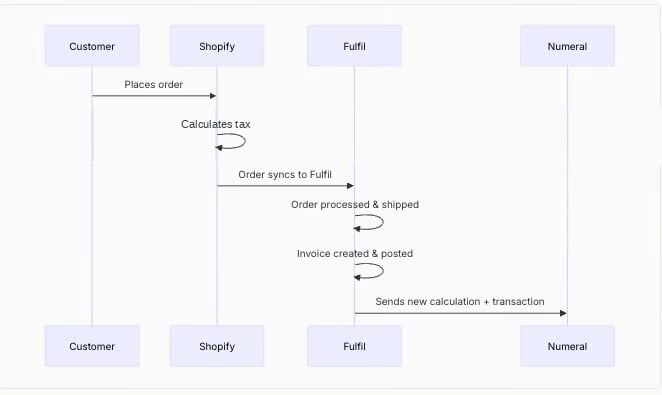
When you sell through Shopify, Shopify uses its own tax engine to calculate the correct tax rate at checkout. Fulfil's Numeral integration handles the compliance side: when invoices are posted in Fulfil, Fulfil sends a new calculation to Numeral using the actual shipped line items and addresses, then records that as a transaction for tax filing. Both systems share the same Numeral account.
* **Shopify uses its own tax engine at checkout**: When a customer places an order, Shopify calculates and applies tax at checkout using its own tax engine.
* **Tax amounts sync to Fulfil**: When orders import into Fulfil, the tax amounts from Shopify come with them.
* **Fulfil sends a fresh calculation to Numeral**: When an invoice is posted, Fulfil sends the actual invoice line items and shipping addresses to Numeral, which recalculates the tax and records it as a transaction for compliance.
**Recommended Setup for E-commerce Merchants**
If you sell through Shopify or another e-commerce platform, we recommend:
1. Connect your Shopify store to Numeral for transaction reporting
2. Enable Fulfil's Numeral integration to report shipped orders for tax filing
***
## Workflow Diagrams
### Using Numeral with Shopify and Fulfil
This workflow shows how Shopify uses its own tax engine at checkout while Fulfil sends a new calculation and transaction to Numeral when the invoice is posted.
 ### Using Numeral with Fulfil Only (Manual Orders)
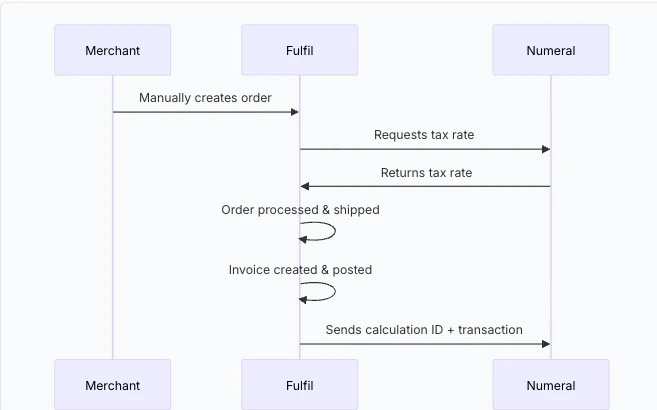
This workflow applies when orders are created directly in Fulfil rather than imported from an e-commerce platform. This typically happens for wholesale orders, phone orders, or other sales where the merchant manually enters the order.
### Using Numeral with Fulfil Only (Manual Orders)
This workflow applies when orders are created directly in Fulfil rather than imported from an e-commerce platform. This typically happens for wholesale orders, phone orders, or other sales where the merchant manually enters the order.
 ***
## What Data is Sent to Numeral
Fulfil uses a two-step process when exporting an invoice to Numeral. First, it creates a tax calculation with your order details. Then, it creates a transaction that references that calculation.
### Calculation (Step 1)
| What Fulfil Sends | Numeral Field |
| ------------------------- | ------------------------------------------------- |
| Warehouse address | `origin_address` |
| Customer shipping address | `customer.address` (type: shipping) |
| Invoice currency | `order_details.customer_currency_code` |
| Line item amounts | `order_details.line_items[].amount` |
| Product SKU | `order_details.line_items[].reference_product_id` |
| Numeral product category | `order_details.line_items[].product_category` |
### Transaction (Step 2)
| What Fulfil Sends | Numeral Field |
| -------------------------- | -------------------- |
| Fulfil invoice number | `reference_order_id` |
| Calculation ID from step 1 | `calculation_id` |
### Addresses
Fulfil resolves addresses differently depending on whether the invoice is linked to a sales order.
**Invoices linked to a sales order:**
| Address | Where It Comes From |
| --------- | ------------------------------------------ |
| Ship-from | Warehouse address on the sale line |
| Ship-to | Customer shipping address on the sale line |
**Standalone invoices (not linked to a sales order):**
| Address | Where It Comes From |
| --------- | ----------------------------------------------------------------------- |
| Ship-from | Company's first registered address |
| Ship-to | Billing address on the invoice, or the customer's first address on file |
**Standalone invoices may use the billing address as ship-to**
For standalone invoices, Fulfil falls back to the invoice billing address as the ship-to address. If the billing address differs from the actual shipping address, Numeral may calculate tax for the wrong jurisdiction. Use invoices linked to sales orders wherever possible to ensure accurate address resolution.
***
## Product Categories
Numeral uses product categories instead of numeric tax codes to determine taxability. Set the appropriate category for each product to ensure correct tax treatment.
In Fulfil, the field is labelled **Tax Code (Numeral)** in the **Tax integrations** section on both product category and product forms. Categories can be set at the product category level or individual product level.
| Product Category | Description |
| ---------------------------- | --------------------------------------------- |
| `GENERAL_MERCHANDISE` | Covers most products; use as the default |
| `EXEMPT` | Services and add-ons exempt from taxes |
| `SHIPPING` | Charges for shipping and handling |
| `SAAS_GENERAL` | Software as a service |
| `SOFTWARE_DOWNLOAD` | One-time software purchases |
| `FOOD_GENERAL` | General food for home consumption |
| `CLOTHING_GENERAL` | General clothing |
| `SUPPLEMENTS_GENERAL` | Dietary supplements and vitamins |
| `BOOKS` | General book category |
| `DIGITAL_DOWNLOAD_ART_VIDEO` | Digital audio-visual downloads |
| `EVENT_TICKETS` | Tickets to live, in-person, or virtual events |
***
## FAQ
Numeral determines whether tax is owed automatically — you do not configure nexus in Numeral's dashboard.
In Fulfil, you add state entries only for states where you collect sales tax. Fulfil uses these to know which account to post the tax to. You do not need an entry for every US state — only add entries for states where Numeral returns a non-zero rate. If Numeral returns zero tax for a state, Fulfil skips it silently.
If Numeral returns a non-zero rate for a state with no entry in the tax rule, the order will fail with **No nexus has been setup for the state.**
* **Tax calculation** happens when a manual order is created in Fulfil. Fulfil uses Numeral to determine the correct tax amount based on the ship-from warehouse and ship-to customer address.
* **Transaction reporting** sends completed invoice data to Numeral for tax filing. This happens when a customer invoice is posted in Fulfil, triggered by an automation rule.
When you post a credit note in Fulfil, the integration looks up the original invoice's Numeral transaction ID and creates a refund in Numeral. The refund is linked to the original transaction so Numeral can adjust your tax liability accordingly.
The credit note must be traceable back to the original invoice — either created directly from it, or generated from a return order that originated from the original sales order.
Standalone credit notes and return orders created independently from the original order cannot be exported to Numeral. These will fail with: `Cannot export credit note to Numeral: unable to find the original invoice.`
Only posted customer invoices are exported. If you set an export start date during configuration, invoices before that date are skipped. Draft invoices are not exported.
Yes. A product category is required for every product Fulfil sends to Numeral, for both rate calculation on manual orders and transaction reporting when invoices are posted.
Without a product category set, that line item is sent to Numeral without one, which can result in incorrect tax rates or incorrect compliance records.
Use `SHIPPING` for shipping and handling charge products, and `EXEMPT` for non-taxable services.
***
## What Data is Sent to Numeral
Fulfil uses a two-step process when exporting an invoice to Numeral. First, it creates a tax calculation with your order details. Then, it creates a transaction that references that calculation.
### Calculation (Step 1)
| What Fulfil Sends | Numeral Field |
| ------------------------- | ------------------------------------------------- |
| Warehouse address | `origin_address` |
| Customer shipping address | `customer.address` (type: shipping) |
| Invoice currency | `order_details.customer_currency_code` |
| Line item amounts | `order_details.line_items[].amount` |
| Product SKU | `order_details.line_items[].reference_product_id` |
| Numeral product category | `order_details.line_items[].product_category` |
### Transaction (Step 2)
| What Fulfil Sends | Numeral Field |
| -------------------------- | -------------------- |
| Fulfil invoice number | `reference_order_id` |
| Calculation ID from step 1 | `calculation_id` |
### Addresses
Fulfil resolves addresses differently depending on whether the invoice is linked to a sales order.
**Invoices linked to a sales order:**
| Address | Where It Comes From |
| --------- | ------------------------------------------ |
| Ship-from | Warehouse address on the sale line |
| Ship-to | Customer shipping address on the sale line |
**Standalone invoices (not linked to a sales order):**
| Address | Where It Comes From |
| --------- | ----------------------------------------------------------------------- |
| Ship-from | Company's first registered address |
| Ship-to | Billing address on the invoice, or the customer's first address on file |
**Standalone invoices may use the billing address as ship-to**
For standalone invoices, Fulfil falls back to the invoice billing address as the ship-to address. If the billing address differs from the actual shipping address, Numeral may calculate tax for the wrong jurisdiction. Use invoices linked to sales orders wherever possible to ensure accurate address resolution.
***
## Product Categories
Numeral uses product categories instead of numeric tax codes to determine taxability. Set the appropriate category for each product to ensure correct tax treatment.
In Fulfil, the field is labelled **Tax Code (Numeral)** in the **Tax integrations** section on both product category and product forms. Categories can be set at the product category level or individual product level.
| Product Category | Description |
| ---------------------------- | --------------------------------------------- |
| `GENERAL_MERCHANDISE` | Covers most products; use as the default |
| `EXEMPT` | Services and add-ons exempt from taxes |
| `SHIPPING` | Charges for shipping and handling |
| `SAAS_GENERAL` | Software as a service |
| `SOFTWARE_DOWNLOAD` | One-time software purchases |
| `FOOD_GENERAL` | General food for home consumption |
| `CLOTHING_GENERAL` | General clothing |
| `SUPPLEMENTS_GENERAL` | Dietary supplements and vitamins |
| `BOOKS` | General book category |
| `DIGITAL_DOWNLOAD_ART_VIDEO` | Digital audio-visual downloads |
| `EVENT_TICKETS` | Tickets to live, in-person, or virtual events |
***
## FAQ
Numeral determines whether tax is owed automatically — you do not configure nexus in Numeral's dashboard.
In Fulfil, you add state entries only for states where you collect sales tax. Fulfil uses these to know which account to post the tax to. You do not need an entry for every US state — only add entries for states where Numeral returns a non-zero rate. If Numeral returns zero tax for a state, Fulfil skips it silently.
If Numeral returns a non-zero rate for a state with no entry in the tax rule, the order will fail with **No nexus has been setup for the state.**
* **Tax calculation** happens when a manual order is created in Fulfil. Fulfil uses Numeral to determine the correct tax amount based on the ship-from warehouse and ship-to customer address.
* **Transaction reporting** sends completed invoice data to Numeral for tax filing. This happens when a customer invoice is posted in Fulfil, triggered by an automation rule.
When you post a credit note in Fulfil, the integration looks up the original invoice's Numeral transaction ID and creates a refund in Numeral. The refund is linked to the original transaction so Numeral can adjust your tax liability accordingly.
The credit note must be traceable back to the original invoice — either created directly from it, or generated from a return order that originated from the original sales order.
Standalone credit notes and return orders created independently from the original order cannot be exported to Numeral. These will fail with: `Cannot export credit note to Numeral: unable to find the original invoice.`
Only posted customer invoices are exported. If you set an export start date during configuration, invoices before that date are skipped. Draft invoices are not exported.
Yes. A product category is required for every product Fulfil sends to Numeral, for both rate calculation on manual orders and transaction reporting when invoices are posted.
Without a product category set, that line item is sent to Numeral without one, which can result in incorrect tax rates or incorrect compliance records.
Use `SHIPPING` for shipping and handling charge products, and `EXEMPT` for non-taxable services.